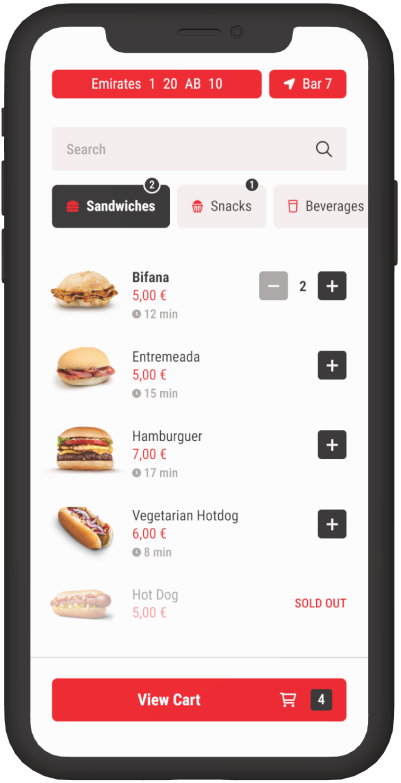
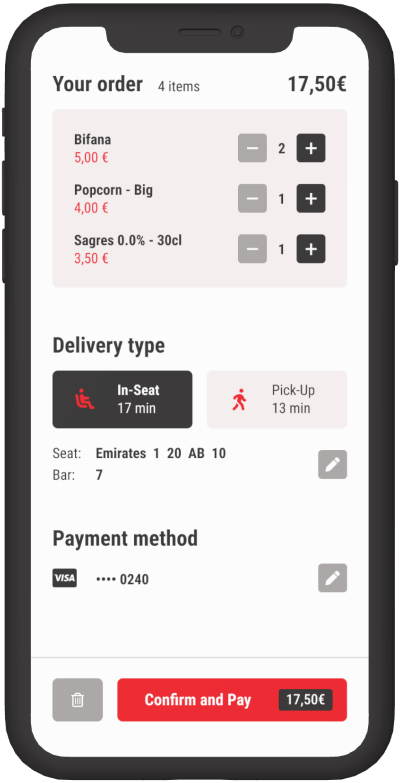
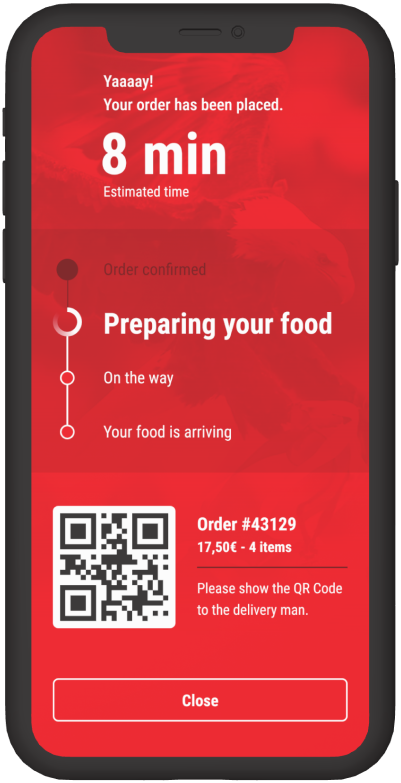
In-seat food order
for SL Benfica
What about ordering food at the stadium without leaving your seat?
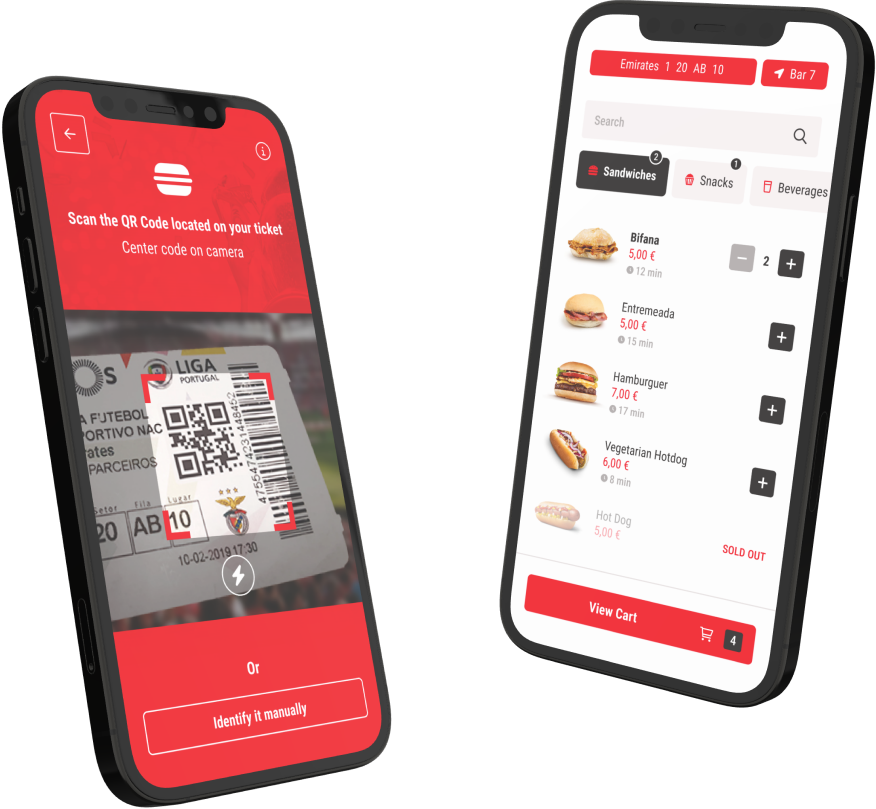
This is Benfica Food, a service with a simple purpose: Delivery of food to your seat.
UX Research
UX Design
UI Design
Prototyping

Context

Overview
Facing queues should not be part of an event in a moment people were supposed to be having fun.

This app comes up to give people a hassle-free way to order food in-seat during the matches and to avoid wasting time in queues, keeping them focused on what they went to do at the stadium.

My role on this project was UX Researcher and UX Designer, performing different tasks and activies, including:
• Research
• Data analysis
• Workshops facilitation
• UX Design (Persona, User Needs, Journeys, User Flows, Wireframing, UI Design, Prototyping and User Testing)

This project was realized by a multi-disciplinary team, including stakeholders from different areas such as UX Design, Front-end and Back-end Development, and Product Management.
Problem Statement
People at "Estádio da Luz" don't want to waste time and miss any second of the match while moving to a bar to order food and drink. Things get worse during half-time due to the high number of people going to the restaurants at the same time.
Business Problem
It results in a negative impact both on people’s experience and also in revenue loss, from a business perspective, as people give up buying food due to queues.
Empathize
Survey
To better know our users, we’ve done an online survey, which was sent to soccer supporters through online communities. It helped us to understand general aspects of the experience at the stadium and its installations, but mainly to understand food consumption behavior during the matches.

The survey had a total of 172 responses.
‍
During the research I was responsible, together with another UX Researcher, for brainstorming questions, structuring the survey itself, and analyzing the data collected.
83%
Male
76%
16-35
(age)
44%
more than 4
matches/year
52%
with friends
46%
eat at the
stadium
Key findings
Some interesting discoveries we made: For those that eat at the stadium, the biggest problem is the queues.

Many people also prefer to eat just before or after, or prefer to eat later. Analyzing the survey we realized that the main reasons for not consuming at the stadium, for them, are also the queues and the price.

So we found 2 opportunities: Improve the consuming experience for those who are already consumers, and also attract new consumers.
Pain Points
After collecting the data, we used the Affinity Mapping method to organize the answers by common topics.

Two topics stood out from the survey: Queues and Prices. Other issues were also relevant, but a little less than the main ones.
Queues
“Waiting on queues is so bad.”
“Wasting time on queues
is the worst thing.”
“I hate queues.”
Prices
“I eat before, because the prices are so high.”
“The food is so expensive.”
“The price is high and the quality is bad.”
Others:
Preparation time
Sold out items
Food Quality
Service Quality
Persona
To better understand and emphasize with the user we were working for, we created a persona.

This persona was a helpful as the team could refer to a person (based on research) during the project, and also supported decision-taking, keeping user always in mind. It also helped us to better select testers for user testing, assuring test results based on our target.
Miguel is a Civil Engineer from Lisbon. He normally likes to spend his free time with friends. His favourites activities are: Going out for dinner, relaxing and watch TV series, or playing soccer.
Miguel
30 years, single
Civil Engineer
Lisbon
Goals
Save time to enjoy the moment with friends and to support his team.
Optimize the money spent.
Needs
A smart and fast way to order food without facing long queues.
A way to previously know when items are sold out.
A simple way to know how long it will take for my food to be prepared.
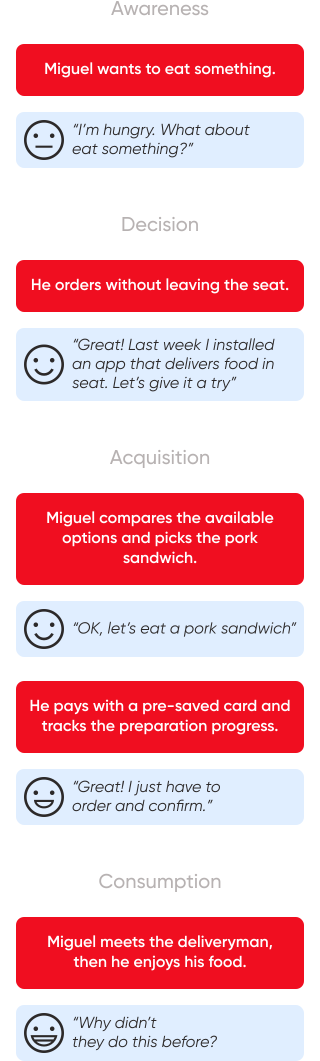
Journey Mapping (Old journey)
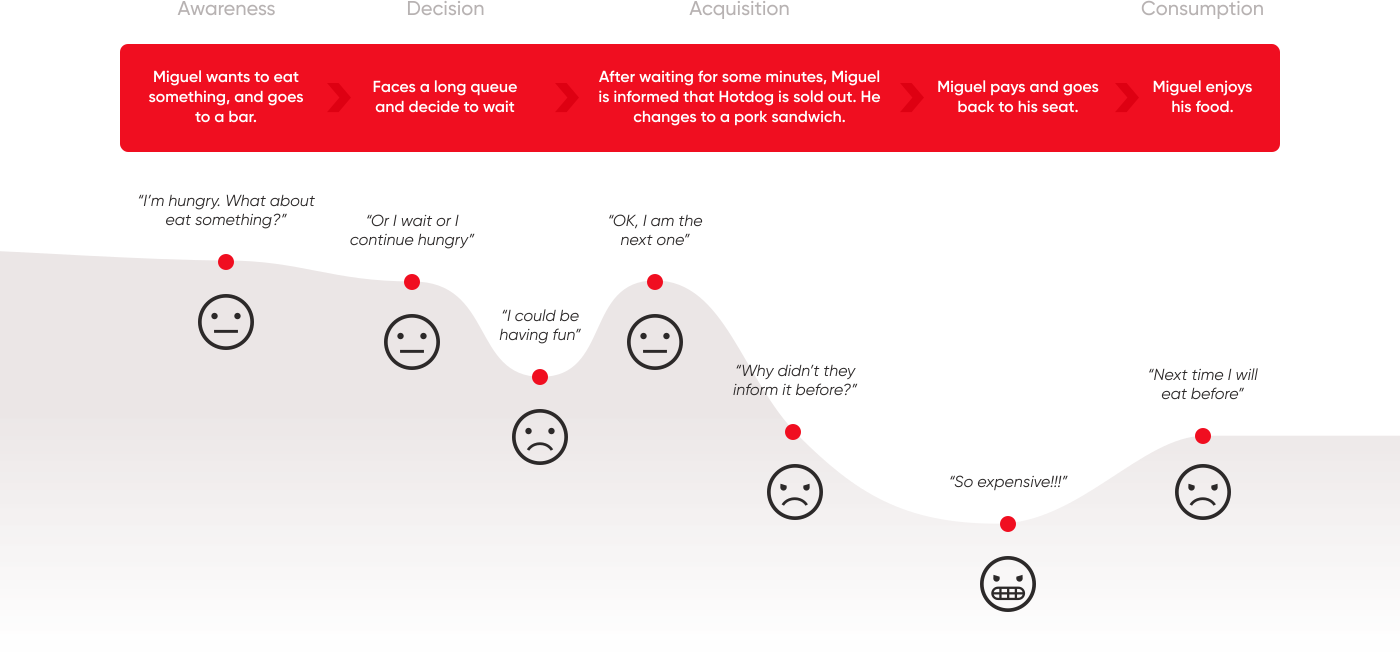
To deeply understand the problem this project was supposed to solve, we mapped the current Customer Journey. It was important to contextualize and give us a big picture of how problematic a food ordering experience at the stadium could be at that moment.

Define

Insight
During the project planning, some business-related constraints and challenges were filled-in by the Project Manager.

Looking at the main two pain points (Queues and Prices), we found a challenge to deal with: How to solve the high-price problem, if we can’t interfere in business decisions?

After some discussion within the team, including UX and Project Management, we decided we shouldn’t focus on reducing prices. We assumed that people want experiences worth their money, regardless the price. After making a desk research to give us more confidence to move forward with this approach we decided to concentrate our forces on delivering to people convenience, comfort, quickness, fun time and consequently increase their perceived value of food consuming experience at the stadium.
‍
(Some studies and articles we collected during the desk research: Link 1 / Link 2 / Link 3)
Focus on increasing people’s perceived value of food consuming experience at the stadium, delivering them convenience, comfort, quickness, and fun time.
User Needs
As we already know our user, his pain points, his typical journey, and where the solution is going to focus, so now it’s time to translate all the info into clear and objective User Needs.

We found out that people want the convenience to order food in their seats, and avoid queues.

Sold-out items were another problem we discovered during the research. Also, there were pain points related to preparation time. Instead of interfering with the cook staff’s processes, we could solve those problems by simply managing users’ expectations, giving to them visibility of what they want to know.
Avoid Queues
Manage expectations
(regarding product stock and time)
Journey Mapping
(improvement)
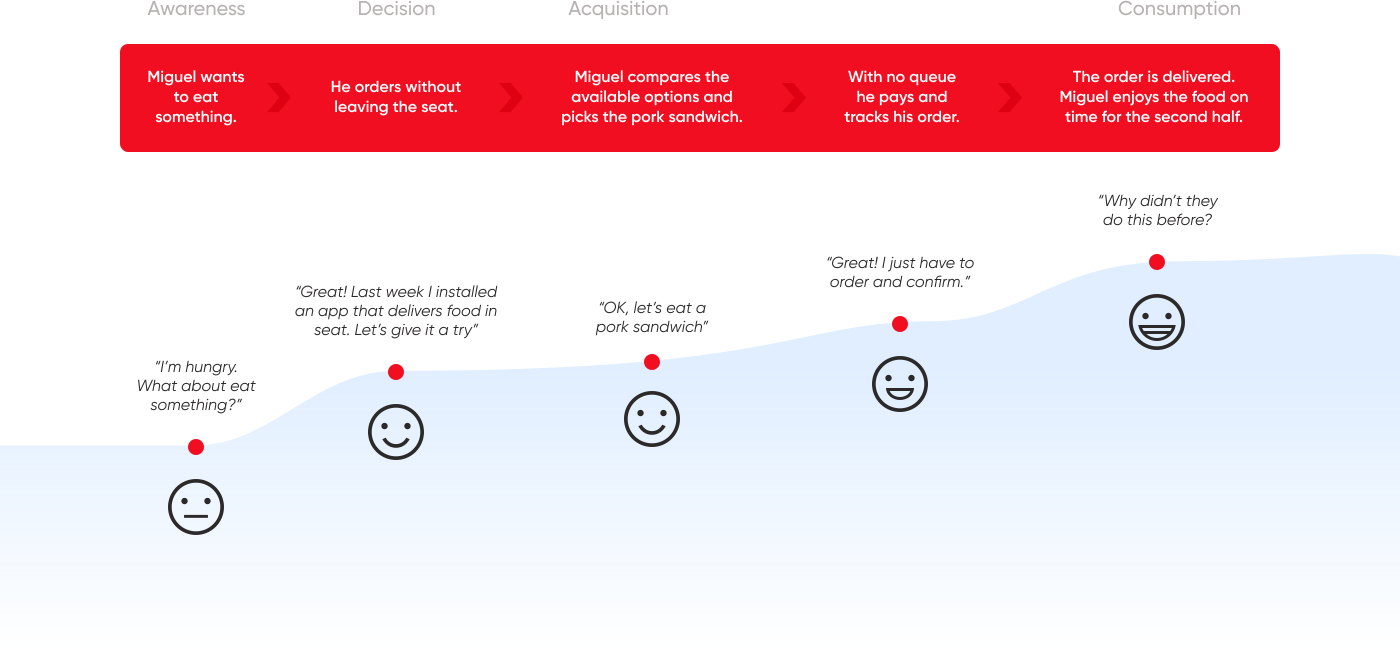
Like we did with the current journey, we also mapped the desired Customer Journey based on user needs. It was essential to have a clear vision of what the user wanted to achieve during the journey.

Ideate

Features
The next step was brainstorming to get insights into features a mobile app should have to approach users’ needs. During the exercise, we always guaranteed we were solving a problem for one of the two pillars: Queues (Q) or Expectation management (EM).

After listing the insights, we performed a Dot Voting exercise to collaboratively decide which ones could be the most impacting.

As we defined the most impacting features, we then relied on the MoSCoW method to prioritize the other features.
Must Have
Seat identification (Q)
Menu with price (Q, EM)
In-app Payment (Q)
Push notifications w/ progress statuses (EM)
Bar selection (Q, EM)
Should Have
Preparation time info (EM)
Disabled status
on sold out items (EM)
Seat scan (on ticket) (Q)
Could Have
Preparation progress timeline (EM)
Product detail (EM)
Order history
Won't Have
Service review
Related products
(Cross-selling)
Loyalty Program
Job Stories
We based on the Job Stories framework to describe each priority feature with a clear definition of the situation, motivation and goal. It would help us in the future to make an overview of the steps and resources needed for each.
1
When I
start an order
I want to
identify my seat
So I can
order food to be delivered without leaving it
2
When I
am making an order
I want to
have a list of available bars and a menu
So I can
choose where to order and what to eat
3
When I
am finishing the order
I want to
have a credit/debit card payment method
So I can
pay directly in the app
4
When I
add a new credit/debit card
I want to
I want the app to save its info
So I can
save time in the next orders
5
When I
place the order
I want to
receive notifications
So I can
follow the status of the preparation
User Flows
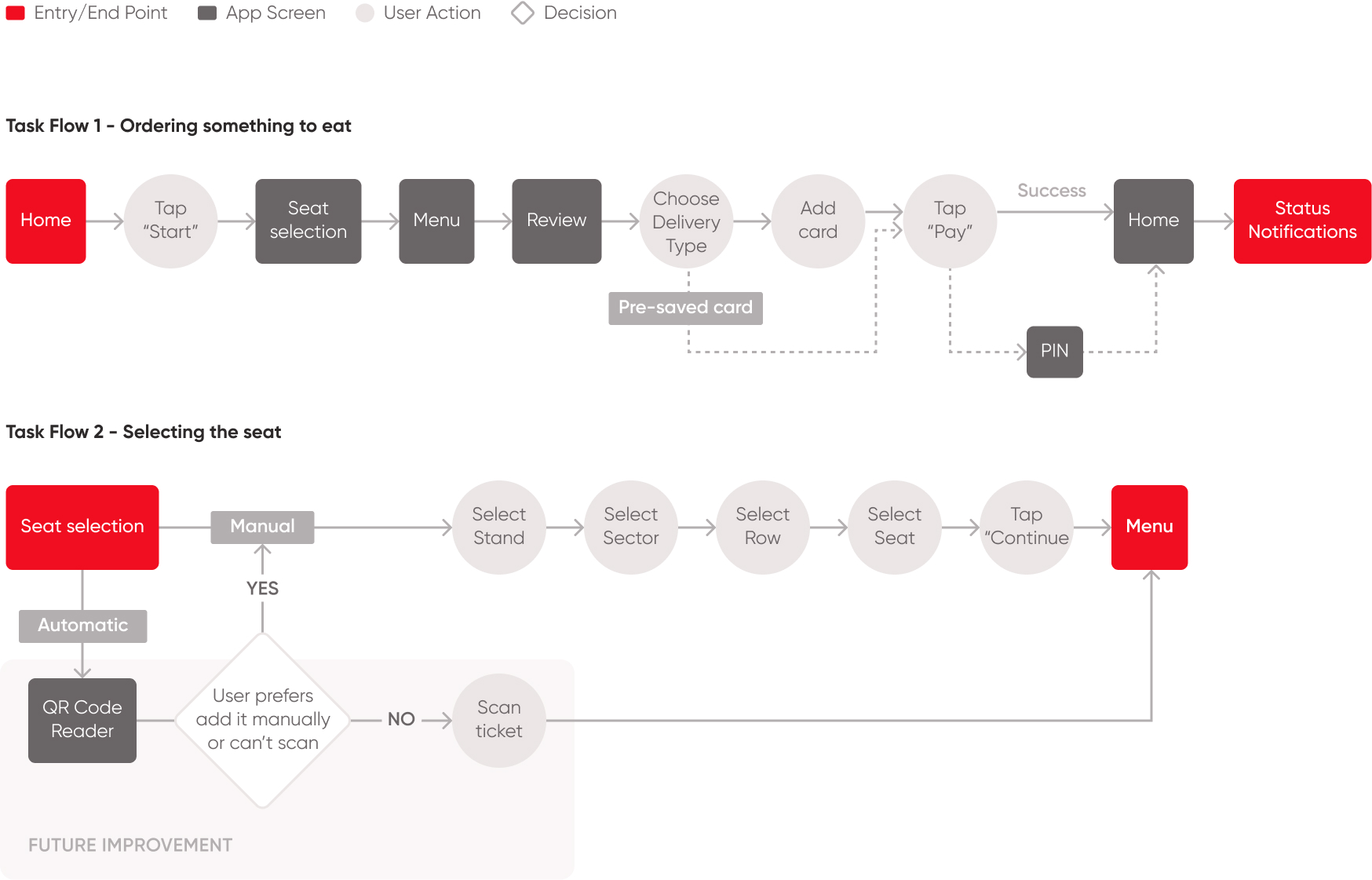
After writing the Job Stories, we realized User Flow workshop sessions to draw the paths the user would then walk through.

We created a complete Flow Chart to have an end-to-end overview since first-time use. We also created task flows focused on specific moments of the main steps.

Prototype

Collaborative Design Sessions
+ concept test
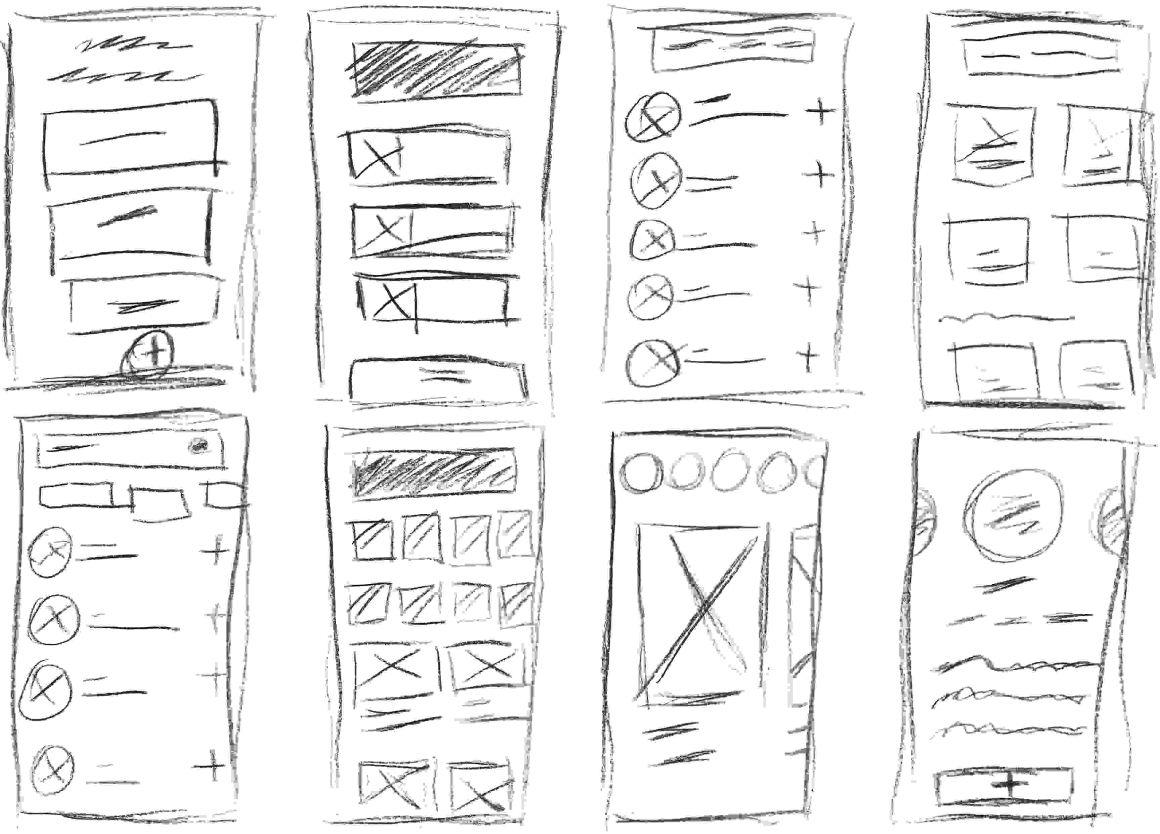
As we reached the sketch phase, we ran a collaborative Design session to put our ideas to paper. At this stage I was responsible to facilitate a Crazy Eights workshop to generate a collection of ideas for the vital moments of the app.

This workshop wasn’t restricted to UX Team. We invited different stakeholders – including the PO, Front-end Devs and Back-end Devs – to help us on this process.

As we done the wireframes, we then collaboratively decided on the most feasible ones and those that would help the user the most.

Afterward, we focused on the main task on the app: Placing an order. We moved forward with the two most voted ideas from the Crazy Eights exercise, created a low-fidelity prototype, and ran a concept test, as a kind of A/B Test, with 5 participants (internal people from non-tech areas) for each version.

One of the versions had a success rate of 5/5, unlike the other one that had 5/5 as well, with some problems and frustrations related to navigation along the task.
KPI & UX Metrics
definition
Time to put hands on. But before starting to design, we first defined the UX Metrics and KPIs that would help us to properly measure the overall aspects of the solution and would give us sufficient data to improve it and increase confidence to take decisions in the future both during User Testing and also after launching the app.

Behavioral UX Metrics
• Task success
• Task time
• Problems and Frustrations
• Abandonment rate

Attitudinal UX Metrics
• CSAT (Customer Satisfaction score)
• SUS (System Usability Scale)

KPIs (after lauching)
• Bar customers growth
• New users per month
UI Design
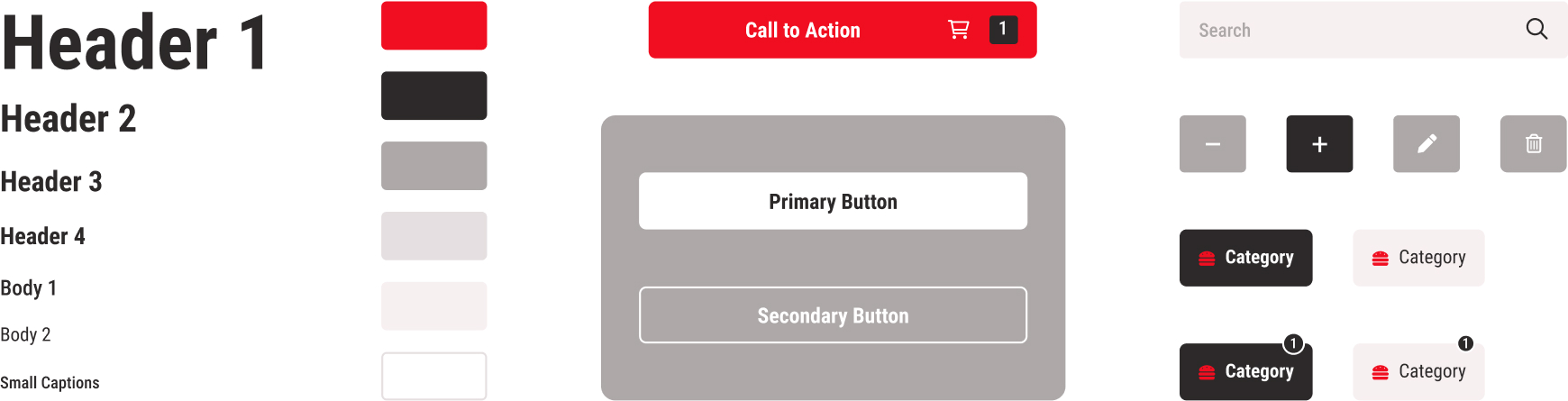
Now, it’s time to materialize and translate all collected data and defined approaches into a tangible visual result.

During this stage we created - in parallel - a UI Kit, that would help us to keep consistency and also to increase speed for prototyping and future iterations.

Test

Hi-Fi Prototype
& User Testing
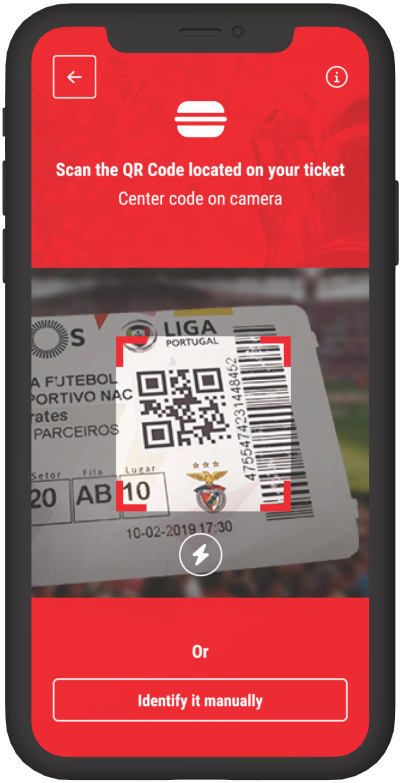
As we finished the design of the interfaces on Figma, we then created a high-fidelity prototype, to realize the User Testing, using Maze platform and Google Meet. After that, we defined the script, with 8 missions focused on the main scenarios of the app.

We chose 5 participants (a widely practiced number, recommended by Nielsen Norman Group) with profiles based on our persona.

User Testing sessions were conducted by me and another Designer (not the best approach, considering Designers can easily bias the tests, but we should play with the pieces that we had in the moment).

During the tests we found some non-destructive issues, related to sold-out items and seat identification that helped us to promptly discuss and correct.

At the end of the round, we obtained a CSAT score of 85% and a SUS score of 82.
5
participants
60m
per session
8
missions
85%
CSAT score
82
SUS score
Learnings
What I’ve learned
Not always what users say is what your team necessarily should focus on. It’s essential to understand business-related limits, what you have the autonomy to solve and what you do not.

Instead of focusing on reducing prices (which we obviously couldn’t solve), we focused on increasing the user’s perceived value, delivering an experience that he would positively keep in his mind.

Cheap or expensive is only a matter of what you pay and receive back.
If people have a good experience, the price is just a number.
Back tO TOP ↑
Want to discuss about future challenges? Let's talk.
tiagogugz@gmail.com